

A Kahoot alternative for adults in corporate training
Praxis Live vs Kahoot
Kahoot is the better pick when the quiz is the point: a fast, competitive game with a leaderboard, a name most of your room already knows, a free plan to try it on, and self-paced courses with certificates on its upper plans.
Praxis Live is the better pick for corporate training where the point is the conversation and what happens after: people talking to each other, sorted by what they said, a report your sponsor can be reading the same afternoon, and follow-up drafted from the room's own answers.
Praxis Live is built by facilitators, for the way facilitators actually run a room.
Checked against Kahoot’s own site on October 4, 2026. See the sources
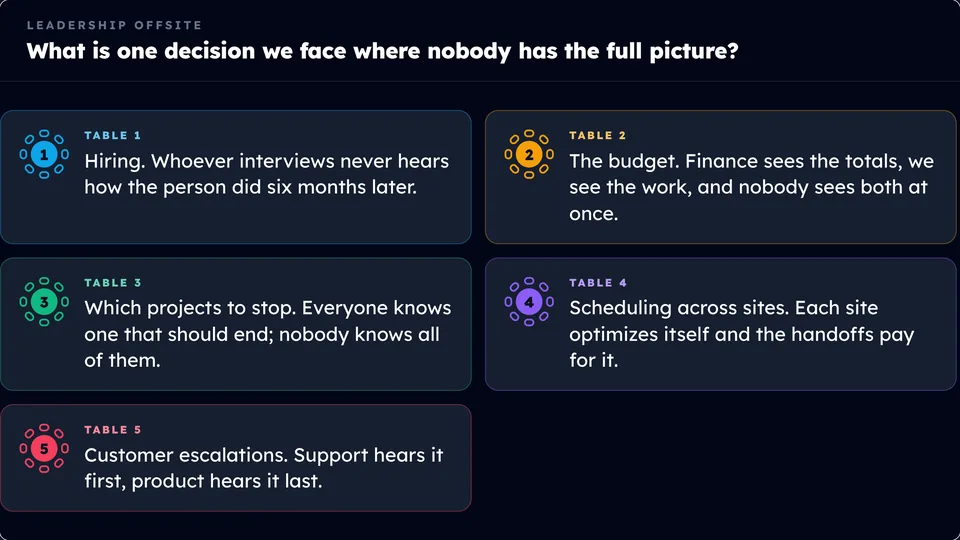
Every table, heard. Then each person leaves with their own page of what they said, next to where the room landed. Sample content.
Side by side
Praxis Live and Kahoot, row by row.
Every Kahoot line is from Kahoot’s own site or help center, checked on October 4, 2026. The small numbers point to the page we read.
| Praxis Live | Kahoot | |
|---|---|---|
| What participants need | A phone or a computer, whichever is handy. They scan a QR code, type a short code, or open it in a browser tab. No app to download. | A phone, tablet or computer with internet. They join at kahoot.it or in the Kahoot app with a game PIN, a link or a QR code, and usually don't need a Kahoot account. The host can ask for a player identifier, which is an email address.4,1 |
| Activity types | The usual ones, like polls, word clouds, Q and A and ranking. Plus icebreakers and team building that are tried and true and built right in, like Classroom 404, Story Relay and Hot Seat. Designed by facilitators, from 30 years of running rooms. | Quiz, true or false, puzzle and poll on every plan, in the classic quiz mode with leaderboards and music. Word clouds, brainstorms, open-ended questions and live Q&A from Pro Standard.1 |
| How people work together | Find Your Match pairs people who picked the same thing, or deliberately the opposite, and tells both of them why. Small Talks sorts the room into groups by what they think. Tabletop gives every table its own answer on the wall. | Team mode: teams compete for the highest average score, with 5 to 20 seconds of team talk per question, and 5 to 100 teams depending on plan. Kahoot places people on teams, or they pick one. Missions turn training into team challenges with a shared leaderboard. We didn't find a feature that pairs people by how they answered.5,1,7 |
| Facilitation methods | Built-in activities for Nominal Group Technique, Dot Vote, What, So What, Now What, table discussions, a photo of each table’s flip chart on the wall, and Before and After. | Brainstorms with voting to prioritize ideas, word clouds, open-ended questions, and Q&A with upvotes.8,1 |
| Turnkey team building games | A Team building shelf: Classroom 404, Story Relay, Grid Logic, The Bigger Picture and Hot Seat. Make a few choices in the editor, and the room needs nothing but their phones. | Team mode, where teams compete on a quiz for the highest average score, and Missions, which turn training into team challenges with a shared leaderboard. We didn’t find turnkey team building games like these.5,7 |
| The report after the session | Praxis drafts a report from what the room said: what to work on next first, then themes and quotes, no names. You edit and approve it, then share one link. | A report snapshot on every plan. Standard reports track individual responses and spot knowledge gaps from Pro Standard; combined reports and advanced insights from Pro Plus.1 |
| Before and after the session | Praxis Journeys, a second product: short sessions before and after, a quick recall, a journal prompt, a weekly challenge and a cohort conversation, with email reminders. Live drafts two or three weeks of follow-up from what the room said; you edit it and place it in the journey. | Self-paced kahoots on every plan. From Pro Plus, courses that combine kahoots, documents and videos, with certificates, assigned by email, plus Missions. Pro Max adds individual learning paths.1,6,7 |
| PowerPoint | Runs on its own screen. Bring in your deck from PowerPoint, Google Slides or Keynote, and the activities go between the slides. It doesn't run inside PowerPoint. | Import PowerPoint, Keynote or PDF slides on every plan, and sync with PowerPoint or Google Slides from Pro Standard. A PowerPoint add-in hosts a kahoot from your presenter view; availability depends on plan.1,9 |
| Building a session with AI | Tell the built-in AI what you want the room to do and it suggests activities, then drafts the one you pick. One click turns an imported slide into an editable one. To build a whole session from your deck or notes, connect your own Claude or ChatGPT. | Kahoot’s AI makes a kahoot from a topic, a PDF, a webpage or your synced slides. A Kahoot app in ChatGPT turns PDFs, notes and ideas into kahoots, and Claude can connect too.10,11 |
| If the internet goes down | Praxis Live needs internet too. Backup PowerPoint downloads the session as a deck that needs none: every activity becomes something the room does with hands, pens or voices. | Joining needs a device with an internet connection. We didn't find an offline version of a session.4 |
| Price | 14-day free trial, no card. | A free Express plan: 15 participants and 15-minute sessions. Pro plans run from $19 a month (50 participants) to $99 (5,000), per presenter, billed yearly; some were on sale when we checked. Customer-facing use, including consulting, needs Pro Max or above. Prices in USD, as shown to us.2,1 |
Fair is fair
Where Kahoot is the better choice
Kahoot is a good tool, and plenty of training teams use it well. If one of these is you, start there.
The quiz is the point
Kahoot’s classic quiz mode, with its leaderboard, podium and music, is what a lot of people picture when they hear “game at work,” and team mode puts up to 100 teams head to head.1,5 For a knowledge check that should feel like a competition, it’s hard to beat.
A name your room already knows
Kahoot says it is loved by billions worldwide and used by millions of professionals.3 Chances are plenty of people in your room have played it before, so nobody needs the join explained.
A free plan and published prices
The free Express plan runs 15 people for 15 minutes, enough to try it with a small team, and every Pro plan has its price on the page.2,1 Praxis Live has a 14-day free trial and no free plan.
Courses, certificates and learning paths
From Pro Plus, Kahoot strings kahoots, documents and videos into self-paced courses, assigns them by email and issues certificates people can share on LinkedIn. Pro Max adds individual learning paths.1,6 If you want a library of self-paced training, that is built in.
A very big audience
Pro Max takes up to 2,000 participants, and Pro Ultra up to 5,000 with onboarding.1 Praxis Live is built for workshops and training rooms.
You want it inside PowerPoint, or AI that reads your deck
A PowerPoint add-in hosts a kahoot right from your presenter view, and paid plans sync with PowerPoint or Google Slides. Its AI can also make a kahoot from your synced slides or a PDF, right in the app.9,1,10 Praxis Live runs on its own screen and takes your deck from PowerPoint, Google Slides or Keynote; to build from a deck with AI, you connect your own Claude or ChatGPT.
Where Praxis Live is different
The games are there. They just aren’t the point.
Phones out, a question on the big screen, a game that gets the room loud: Praxis Live does that part too. It is built around what comes next: people talking to each other about the work, and what they said still working for them after everyone goes home.
01
More than a dozen games, built to serve the session.
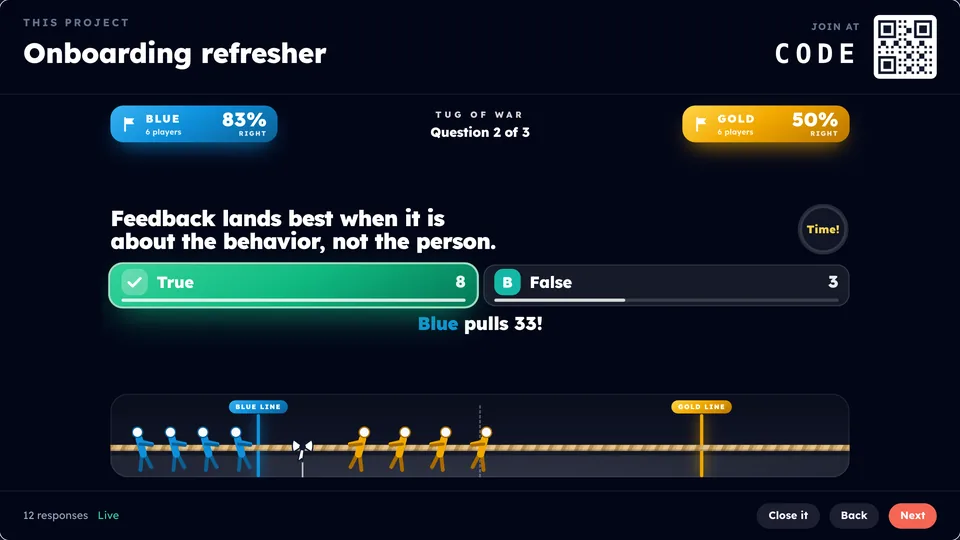
Tug of War, where every right answer pulls the rope for your team. Survey Says, where teams guess what the room said in an earlier word cloud and flip the board. Closest Without Going Over, which turns the stat on your slide into a guessing game. Most of them run on whatever you taught that morning.
So the energy goes back into the content, and then the room gets back to the work. A game is one step in the session, between the conversations, not the whole session.
02
People talk to each other, sorted by what they said.
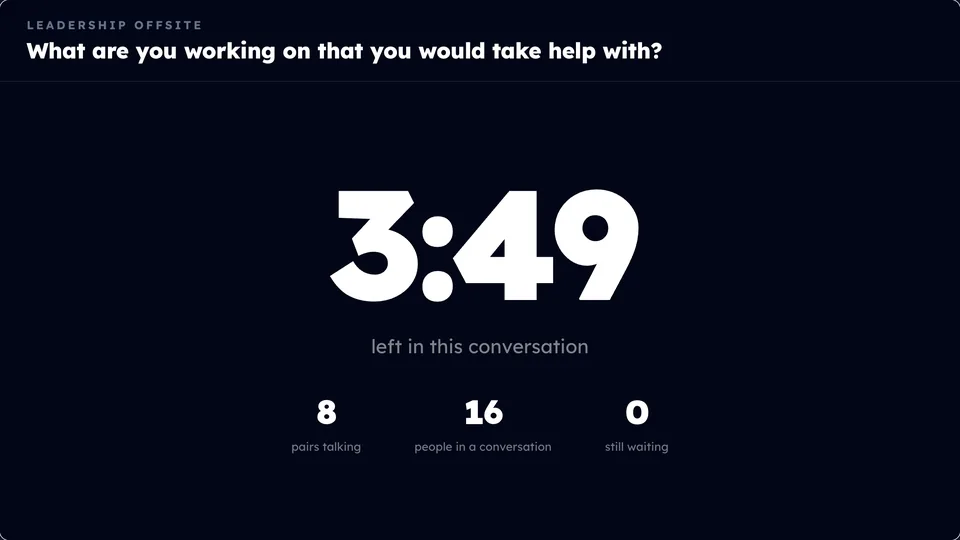
A team in a quiz is a group that shares a score. Here, the groups come from what people think. Small Talks turns everyone’s answer into a colored badge on their phone, and the room sorts itself by it. Find Your Match pairs people who picked the same thing, or deliberately somebody who picked the opposite, and tells both of them why.
A first name goes to one other person, and the phone says so before anyone answers. Then they go find each other and talk.
03
The methods you already run on flip charts, built in.
Nominal Group Technique: everybody writes alone before anybody speaks, then the room ranks. Dot Vote. What, So What, Now What. Table discussions that come back as words on the wall, and a photo of each table’s flip chart, typed up by AI with every unsure word marked. Before and After, which leads with what didn’t move.
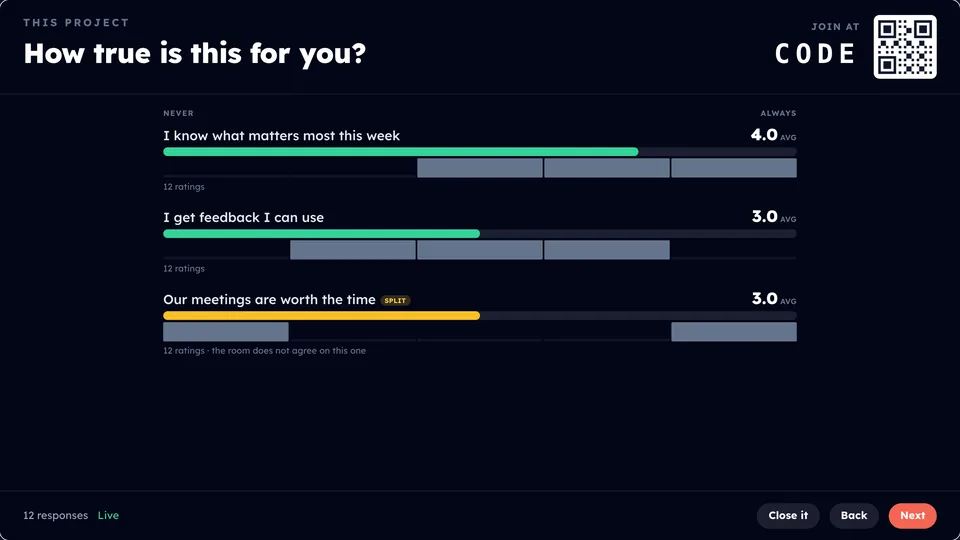
There is no right answer to score, so a divided room is a finding. When a statement splits the room, Praxis Live draws the spread and labels it: the room does not agree on this one.
Having people write ideas alone before pooling them produces more ideas than open discussion. That is why the nominal group technique exists.Van de Ven and Delbecq (1974), Academy of Management Journal 17(4), 605-621.
04
What the room said keeps working after the room.
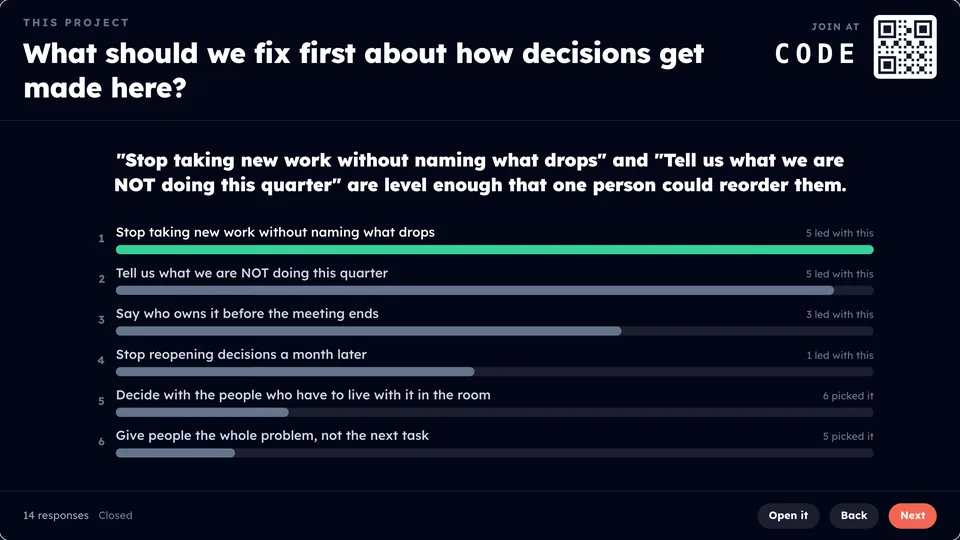
When the session ends, Praxis drafts a report from what the room said: what to work on next at the top, then the themes and quotes, no names attached. AI helps draft it, and you approve it before it’s shared. Your sponsor can be reading it the same afternoon. Each person also leaves with their own page of what they said, next to where the room landed.
Then Praxis drafts two or three weeks of Monday, Wednesday and Friday follow-up from the room’s own answers. You edit it and place it in a Praxis Journey: sessions under 15 minutes, a quick recall, a journal prompt, a weekly challenge, the cohort talking it through, and an email when each one is ready. Praxis Journeys starts with a call, and isn’t part of the 14-day trial.
Leading Through Change · Day 1
SampleWhat to work on next
The room is ready to name hard things, and stuck on where to start. Pick one priority for the next thirty days and make it the first agenda item every week.
What the room kept coming back to
- Saying the hard thing early14
- Too many priorities at once11
- Feedback only flows down8
- Meetings without decisions5
“We agree in the room and then nobody owns it on Monday.”
Quotes are shown with no names.
About AI
Both use AI. They point it at different things.
Matched. Both build from a prompt and connect to ChatGPT or Claude. Kahoot’s AI also makes a kahoot from a PDF or your synced slides inside the app, which Praxis Live does only through your own Claude or ChatGPT.10,11
Different. Praxis drafts the weeks after from the room’s own answers, types up photographed flip charts, and drafts a sponsor report that is shared only after you approve it. We didn’t find those in Kahoot.
Using both
You don’t have to pick one for everything.
Plenty of companies already use Kahoot for compliance refreshers, onboarding quizzes and the all-hands trivia round. Keep it there. Use Praxis Live for the working sessions: the leadership offsite, the training day, the room where people need to talk to each other and decide something together.
Praxis Journeys works on its own too, so a program can add the before and the after around any session. The one thing that needs Praxis Live in the room is follow-up drafted from what that room actually said.
Questions buyers ask
Kahoot or Praxis Live?
- Is Praxis Live a good Kahoot alternative for adults in corporate training?
- Yes, when the session is about people thinking together rather than scoring points. Joining works the same way, from phones with no app to download. The difference is what the room does with it, like pairing people by how they answered and built-in methods such as nominal group technique, and what happens after: a report you approve for your sponsor, and follow-up drafted from the room's answers in Praxis Journeys. If a fast competitive quiz is the goal, Kahoot may suit you better.
- Does Praxis Live have games like Kahoot?
- Yes, more than a dozen, among them Tug of War, Survey Says, Closest Without Going Over and Two Truths. Most run on whatever you taught that morning, and they sit between the conversations as one step in the session. There is also a Team building shelf of turnkey team games, like Classroom 404, Story Relay and Grid Logic, that need nothing but phones.
- Does Kahoot have anything for after the session?
- Yes. Kahoot has self-paced kahoots on every plan, courses with certificates assigned by email from Pro Plus, individual learning paths on Pro Max, Missions for team challenges, and reports. Praxis plans the weeks after from what your room said: short sessions with a recall, a journal prompt, a challenge and the cohort, and an email when each is ready.
- How do Praxis Live and Kahoot compare on AI?
- Both build from a prompt and connect to ChatGPT or Claude, and Kahoot's AI also makes a kahoot from a PDF, a webpage or your synced slides inside the app; Praxis Live builds from a deck only through your own Claude or ChatGPT. Praxis points AI at different jobs: drafting the weeks after from the room's own answers, typing up photographed flip charts, and drafting a sponsor report that is shared only after you approve it.
- Is there a free version?
- Kahoot has a free Express plan for 15 participants and 15-minute sessions. Praxis Live has a 14-day free trial with no card, and when the trial ends it simply stops.
- Do people need to download an app?
- Not for either one. With Praxis Live, people join in the browser on a phone or a computer: scan a QR code, type a short code, or open it in a tab. Kahoot has an app, and people can also join at kahoot.it in a browser with a game PIN, a link or a QR code.
- Does Praxis Live work inside PowerPoint?
- No. Praxis Live runs on its own screen. Bring in your deck from PowerPoint, Google Slides or Keynote, and the activities go between the slides. Kahoot has a PowerPoint add-in, depending on plan, and syncs with PowerPoint or Google Slides from Pro Standard.
See it with your own group.
Play a demo right now, no sign-in. Or build a session with your slides and run it for real: free for 14 days, no card, and when the trial ends it simply stops.
Praxis Journeys, the before and after, starts with a call. It isn’t part of the trial.
How we checked
Every Kahoot fact on this page comes from Kahoot's own sites and help center, read on October 4, 2026. Prices are the ones its pricing page showed us in US dollars, before tax. Their plans and features change, so if something here has moved, tell us and we’ll fix it.
- 1.Kahoot! 360 business plans and pricing
- 2.Kahoot! 360 Express, the free plan
- 3.Kahoot! home page
- 4.Kahoot! help: How to join a Kahoot! game
- 5.Kahoot! help: Team experience, how to play kahoot in groups
- 6.Kahoot! help: Kahoot! courses, how to create
- 7.Kahoot! 360: Collaborative learning with Missions
- 8.Kahoot! 360: Brainstorming tools
- 9.Kahoot! help: How to host live kahoots in Microsoft PowerPoint
- 10.Kahoot! help: How to generate a kahoot with AI
- 11.Kahoot! help: How to create kahoots with ChatGPT